- Share
-

-

Why Does HubSpot Integration Strategy Matter?
Most companies do not use HubSpot in isolation. Customer data may move between HubSpot, Salesforce, an ERP, billing software, product databases, customer support platforms, data warehouses, or internal applications.
Each connection creates another opportunity for data to become inconsistent.
Consider a company where HubSpot stores a customer's account owner, the ERP stores billing information, and a product system stores usage. If all three systems can update the same CRM fields without clear rules, the company can end up with competing versions of the same customer.
Integration strategy answers the questions that technical configuration alone cannot:
- Which system owns each data point?
- Which fields should be read-only in HubSpot?
- Should a change move one way or both ways?
- How should conflicts be resolved?
- What happens when a record does not match?
- How will failures be detected and corrected?
10 HubSpot Integration Problems That Create Bad CRM Data
1. No defined system of record
If multiple applications can be considered the source of truth for the same field, conflicts become inevitable.
Define ownership at the field or object level. For example, billing status may belong to the finance system while lifecycle status may be managed in HubSpot.
2. Two-way sync without conflict rules
Two-way sync can be useful, but it requires clear conflict handling. If both systems update the same field, decide which value wins and under what conditions.
3. Duplicate records are created across systems
A contact or company can be created in HubSpot and then recreated by another system if matching logic is weak.
Use stable identifiers and explicit matching rules. Do not rely only on names, because names can change and are rarely unique.
4. Field mapping is treated as a one-time task
Fields change. Teams rename properties, introduce new values, change formats, and retire old processes.
Integration mappings should be documented and reviewed as part of CRM governance.
5. Data formats do not match
One system may store a country as a code while another uses a full name. A billing platform may store a date in one format while HubSpot expects another.
Normalization rules should be established before data reaches downstream automation or reporting.
6. Sync errors are invisible
A failed API call or rejected record is not harmless if nobody knows it happened.
Create error logging, monitoring, alerts, and a process for retrying or correcting failed records.
7. Integrations trigger automation unintentionally
An integration update can change a property that enrolls a record in a HubSpot workflow. That workflow may then send an email, change lifecycle stage, create a task, or reassign an owner.
Review integration-triggered properties before enabling automation.
8. Historical data is synced without a purpose
Moving every available field from every system can create a large amount of noise.
Decide which historical data supports reporting, customer context, segmentation, or compliance requirements. Keep the CRM focused on information the business actually uses.
9. Sync frequency does not match the business process
Some processes need near-real-time updates. Others can run hourly or daily.
The correct sync frequency depends on the decision the data supports. Faster is not automatically better if it creates unnecessary load or complexity.
10. No post-launch monitoring exists
An integration can pass a launch test and fail weeks later after a property change, API update, authentication issue, or new record type is introduced.
Treat integrations as ongoing systems, not completed projects.
How Poor Data Sync Affects Automation and Reporting
HubSpot automation and reporting are only as reliable as the data feeding them. When an integration introduces delays, duplicates, incorrect values, or inconsistent field updates, the impact can extend far beyond the integration itself.
For example, if a billing status reaches HubSpot late, a customer-success workflow may trigger based on outdated information. If account ownership is overwritten incorrectly, lead-routing rules, task assignments, and follow-ups may be directed to the wrong person.
Reporting is affected in the same way. A dashboard may calculate its metrics correctly but still present misleading results if the underlying records are incomplete, duplicated, or out of sync.
This makes it important to distinguish between a reporting issue and a data issue. If a dashboard shows an unexpected number, changing the report filter or calculation may only mask the problem. The actual cause could be an incorrect field mapping, failed sync, duplicate record, or timing mismatch between systems.
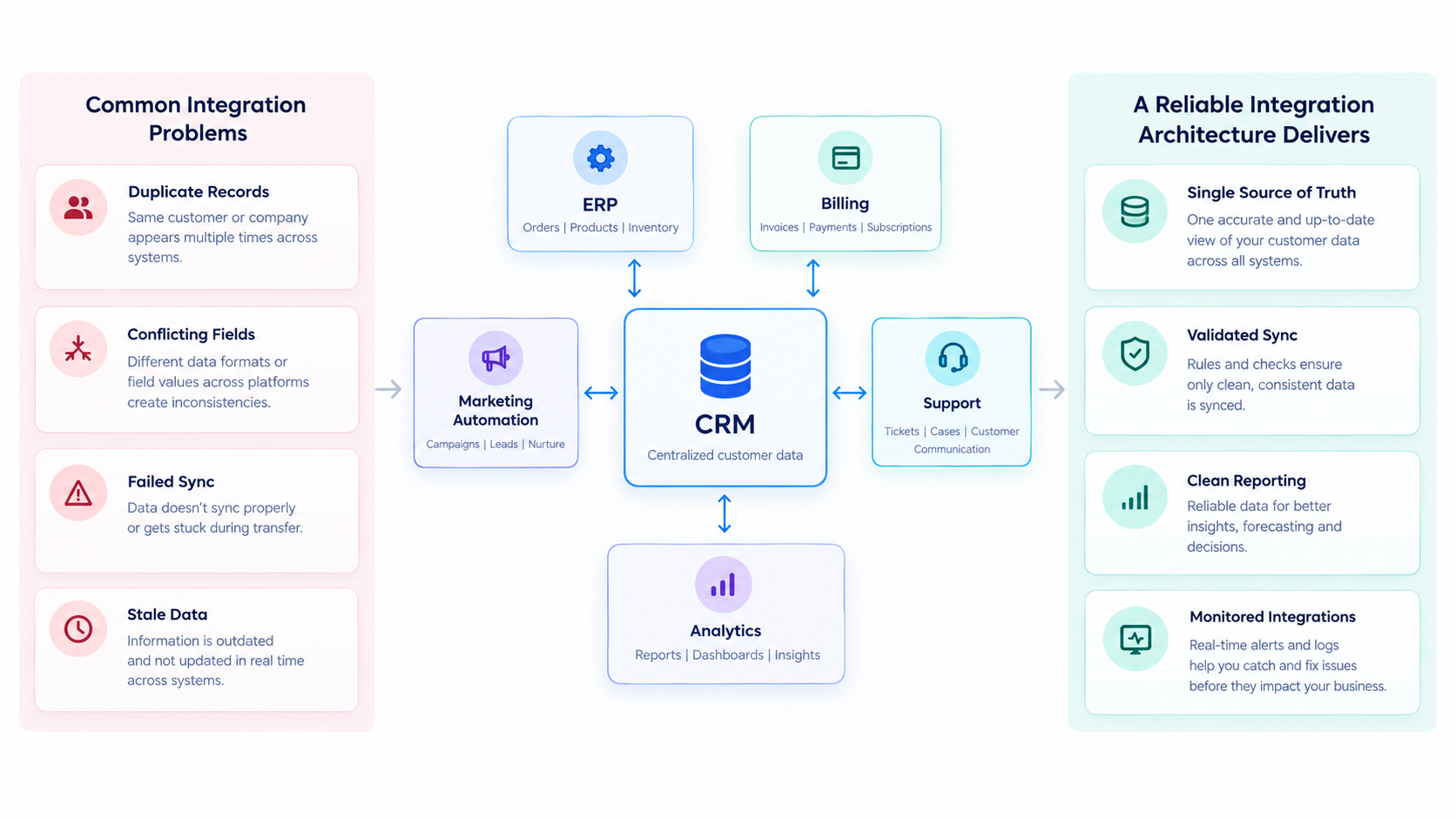
A reliable hubspot integration architecture therefore treats data quality as a prerequisite for automation and reporting. Before troubleshooting a workflow or dashboard, validate whether the underlying data is complete, accurate, consistently mapped, and synchronized at the expected frequency.
How to Design a Reliable HubSpot Integration Architecture
Start with a data ownership map
List the key objects and fields moving between systems. For every important field, identify the system that owns it.
Define the direction of movement
Decide whether data should flow into HubSpot, out of HubSpot, or in both directions. Do not default to two-way sync unless the process genuinely requires it.
Establish matching logic
Define how the integration recognizes an existing contact, company, deal, or other record. Prefer stable identifiers where available.
Normalize values before automation
Standardize formats, enumerations, country values, dates, lifecycle definitions, and other fields that multiple systems depend on.
Separate integration logic from business automation
Where possible, make it clear which changes are produced by the integration and which are produced by HubSpot workflows. This makes troubleshooting much easier.
Build monitoring into the design
Track successful syncs, failed records, authentication issues, unexpected volume changes, and records that could not be matched.
Document exception handling
A reliable integration should have a known process for partial failures, duplicate matches, invalid values, API limits, and manual correction.
What to Validate Before Launching a HubSpot Integration
A successful connection does not necessarily mean an integration is ready for production. Before launch, validate how the integration will behave with real data, existing workflows, and day-to-day business processes.
Use the following pre-launch checks:
- Define the system of record:
Confirm which platform owns each critical field and which system should take precedence when values conflict. - Confirm sync direction:
Document whether each field or object requires one-way or two-way synchronization. - Validate record matching:
Test matching rules, unique identifiers, and duplicate-prevention logic before records begin syncing. - Test field mappings:
Verify that fields, formats, values, and data transformations are mapped correctly between systems. - Test incomplete and invalid data:
Check how the integration handles missing, outdated, incorrectly formatted, or unexpected values. - Review workflow dependencies:
Confirm that synced data does not unintentionally trigger, interrupt, or overwrite existing HubSpot workflows and automation. - Define historical-data requirements:
Decide which existing records need to be migrated or synchronized and which should remain outside the integration. - Test errors and retries:
Verify how failed syncs are logged, retried, escalated, and ultimately resolved. - Verify authentication and permissions:
Ensure credentials, API access, scopes, and user permissions are appropriate and secure. - Confirm sync frequency:
Validate that the sync schedule or real-time behavior meets the business requirement without creating unnecessary API usage or delays. - Set up monitoring and alerts:
Establish visibility into failed syncs, unusual activity, data discrepancies, and integration downtime. - Reconcile the initial sync:
Compare record counts and sample records across both systems to confirm that data has transferred and transformed as expected.
The final approval should go beyond technical connectivity. An integration is ready for launch when the team can clearly explain what data moves, which system owns it, why it moves, where it belongs, how often it syncs, and what happens when something goes wrong.