











No Shortcuts. Just a Proven Joomla to HubSpot CMS Migration Process
This isn't a quick export. We break down the migration in clear phases
Understand your existing CMS landscape.
- Review themes, templates, and custom page structures
- Identify plugin-driven functionality and dependencies
- Audit forms, tracking scripts, and third-party tools
- Assess SEO performance, rankings, and indexed URLs
- Define what should be retained, replaced, or improved

Replace plugin-heavy setups with native CMS components
- Translate native CMS themes into HubSpot templates and modules
- Redesign layouts to reduce reliance on custom code
- Define global sections for navigation and shared elements
- Plan a clean URL structure and redirect strategy
- Align CMS structure with future content needs
.webp?width=327&height=250&name=Solving%20Data%20intake%20(from%20all%20demand%20sources).webp)
Validate the approach before full-scale migration
- Set up a HubSpot CMS sandbox or staging environment
- Build core templates and commonly used modules
- Migrate a sample set of pages and blog posts
- Test content editing, SEO metadata, and internal links
- Lock migration patterns before production work
Rebuild the site without WordPress overhead
- Recreate page layouts using HubSpot CMS modules
- Migrate blog content, pages, and media assets
- Rebuild forms and lead capture flows natively
- Implement analytics, consent, and tracking scripts
- Run continuous QA throughout execution

Ensure stability, search parity, and performance
- Verify content accuracy and layout consistency
- Validate SEO elements and redirect coverage
- Test forms, notifications, and CRM routing
- Check responsiveness across devices
- Optimize speed and page performance
Hand over a site that’s easy to manage
- Train teams to publish and update content confidently
- Document templates, modules, and workflows
- Set roles, permissions, and governance standards
- Provide post-launch support and monitoring
- Decommission WordPress hosting and plugins

Full-Stack Joomla to HubSpot CMS Migration
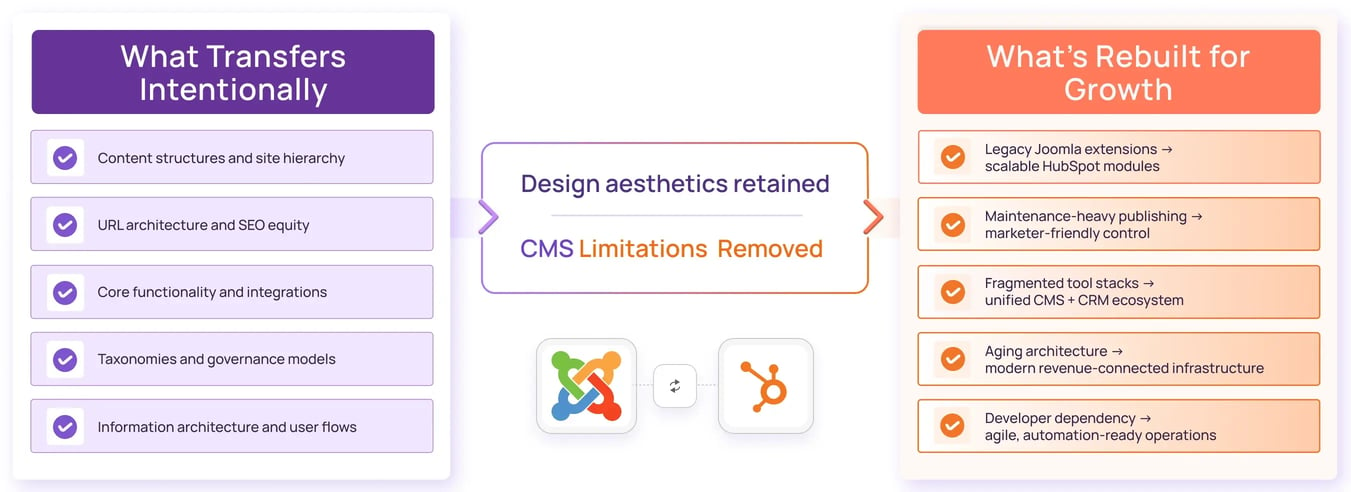
We manage end-to-end Joomla migration initiatives by rebuilding Joomla websites inside HubSpot CMS using structured templates, governed modules, CRM-native forms, and scalable content architecture.
Our Frequently Asked Questions
The cost of a Joomla to HubSpot CMS migration generally ranges from $5,000 to $30,000 depending on content volume, template complexity, extensions, integrations, and redevelopment requirements.
Most Joomla migration projects take between 4 and 8 weeks. Larger websites with custom extensions, multilingual content, or complex integrations may require additional implementation time.
No. A properly executed Joomla migration preserves URLs, redirects, metadata, structured data, and internal linking to protect search rankings and maintain organic traffic.
Businesses migrate from Joomla to HubSpot CMS to reduce extension dependencies, simplify website management, improve security, and connect content directly to CRM, marketing automation, and reporting systems.
Yes. Joomla websites are typically rebuilt and tested within HubSpot before launch, allowing for a controlled transition with minimal disruption to users and business operations.
Joomla extensions are not migrated directly. Their functionality is evaluated and rebuilt using HubSpot modules, native HubSpot tools, HubDB, integrations, or custom development where required.
Yes. Joomla categories, content organization, navigation structures, and information architecture can be recreated within HubSpot CMS while improving usability and scalability.
For most marketing teams, HubSpot CMS is significantly easier to manage than Joomla. It provides a user-friendly editing experience without requiring ongoing maintenance of extensions, hosting, or software updates.
Yes. Many companies combine Joomla migration with a redesign initiative to modernize branding, improve conversion rates, optimize user journeys, and create a more scalable website architecture.
Joomla templates are not directly transferred to HubSpot CMS. Instead, they are recreated as flexible HubSpot themes and modules that support easier management and future scalability.
Yes. HubSpot CMS supports multilingual content, language variations, localization strategies, and international SEO requirements, making it suitable for global Joomla migrations.
HubSpot CMS provides managed hosting, enterprise-grade security, SSL, automated updates, and infrastructure management. This reduces the security risks commonly associated with maintaining Joomla extensions and hosting environments.
Yes. Existing integrations can be mapped and rebuilt within HubSpot using native connectors, APIs, middleware platforms, or custom integration solutions based on business needs.
Common Joomla migration challenges include extension dependencies, outdated templates, content cleanup, SEO preservation, and integration compatibility. Proper planning helps ensure a successful transition.
While smaller Joomla websites can be migrated internally, most businesses work with a HubSpot migration partner to manage content mapping, theme redevelopment, SEO preservation, integrations, and launch execution.
Relatable? We should definitely talk.
All that we’ll cover when we speak:
- Opportunities to increase the ROI of your HubSpot investment
- Your current GTM motions and future roadmap
- Challenges that you face with your overall revenue stack
- Missed revenue opportunities due to gaps in your funnel
- What would "wins" look like for you?




.webp?width=210&height=116&name=Frame%201321318036%20(1).webp)
.webp?width=272&height=116&name=Frame%201321318036%20(2).webp)
.webp?width=205&height=116&name=Frame%201321318036%20(3).webp)
.webp?width=197&height=116&name=Frame%201321318036%20(4).webp)

.webp?width=197&height=116&name=Frame%201321318036%20(5).webp)
.webp?width=197&height=116&name=Frame%201321318037%20(1).webp)
.webp?width=309&height=116&name=Frame%201321318036%20(6).webp)
.webp?width=197&height=116&name=Frame%201321318037%20(2).webp)
.webp?width=197&height=116&name=Frame%201321318036%20(7).webp)
.webp?width=197&height=116&name=Frame%201321318037%20(3).webp)
.webp?width=265&height=116&name=Frame%201321318036%20(8).webp)
.webp?width=264&height=116&name=Frame%201321318037%20(4).webp)
.png?width=2000&name=VER.2%20(2).png)