
- Share
-

-

Why Are So Many Companies Migrating Off Weebly in 2026?
Because Weebly has been dying in slow motion since 2018, and everyone still using it is playing a game of musical chairs with no music left.
Square acquired Weebly, killed the roadmap, and walked away. The last product update shipped in June 2021. The mobile app vanished from both app stores in December 2025. Official support ends mid-2026. After that, existing users get pushed toward Square Online, which is not a migration.
It is a rebuild. Weebly is not being sunset. It is being abandoned.
Roughly, 50,000 websites still run on Weebly according to W3Techs data from early 2026. That is half a million sites sitting on infrastructure that no one is maintaining, patching, or improving. Most of those companies are now evaluating modern CMS platforms like HubSpot, WordPress, or Webflow.
If your enterprise website has no CRM connection, no marketing automation, no attribution reporting, that is a revenue blackout.
HubSpot CMS changes this. It eliminates every one of those gaps by design, which is why Weebly to HubSpot migrations have accelerated sharply in the past 18 months.
What Content and Data Moves in a Weebly to HubSpot Migration?
More than you expect, and less cleanly than you hope.
A HubSpot CMS migration is not a file transfer. Every element of your Weebly site has to be mapped to a specific HubSpot equivalent, and the mapping decisions you make here determine whether the new site creates compounding value or just recreates old problems on newer infrastructure.
Here is what moves and how each component should be handled.
|
Weebly Asset |
HubSpot Equivalent |
What to Watch For |
|
Static pages |
HubSpot CMS Pages |
Rebuild on templatized modules. Every old URL needs a 301 redirect mapped before content rebuild starts. |
|
Blog posts |
HubSpot Blog |
Manual migration. Author, publish date, categories, and meta must be recreated per post. Weebly has no structured export format for blogs. |
|
Forms |
HubSpot Forms (native) |
Replace every Weebly form with a HubSpot native form. Map each field to the correct CRM property. Test submission routing before launch. |
|
Images and files |
HubSpot File Manager |
Download everything. Rename files with keyword-descriptive names before re-uploading. Compress to under 100KB per image. |
|
Navigation |
HubSpot Menu Modules |
Rebuild in drag-and-drop editor. Test mobile rendering on at least three viewport sizes. |
|
SEO metadata |
HubSpot SEO Panel |
Title tags, meta descriptions, canonical URLs, and alt text migrate manually. Verify each page. |
|
Contact and lead data |
HubSpot CRM |
Export from Weebly as CSV. Clean duplicates and normalize fields. Import with lifecycle stage and lead source mapping. |
|
Custom code or scripts |
HubSpot Custom Modules / HubL |
Audit every script. Replace third-party hacks with native HubSpot equivalents where possible. Custom code moves into HubL templates. |
|
E-commerce (if applicable) |
HubSpot Payments or integration |
Weebly e-commerce ran on Square. Evaluate whether HubSpot Commerce Hub or a dedicated platform like Shopify is the right fit post-migration. |
Weebly does not let you export blog content in a structured format. There is no XML feed, no CSV export, no API endpoint for blog posts.
You copy each post manually or you scrape it. Budget time for this.
On a site with 50 blog posts, this step alone takes 15 to 20 hours if you are preserving metadata, internal links, and image placement correctly.
The other item consistently overlooked is form submission history.
Working with an experienced HubSpot CMS migration agency compresses the timeline and eliminates the risk of data loss during the cutover.
Weebly stores form responses inside its own dashboard. When your Weebly subscription ends, that data disappears. Export every form submission before you begin rebuilding anything. If you lose historical lead data during migration, no redirect map in the world will fix that.
How to Migrate from Weebly to HubSpot CMS: The 7-Step Process
Most migration guides give you seven bullet points and call it a process. That is roughly as useful as a recipe that says "combine ingredients, apply heat." The steps below reflect what an actual HubSpot CMS migration looks like in practice, including the substeps and gotchas that determine whether you lose two weeks of rankings or two quarters.
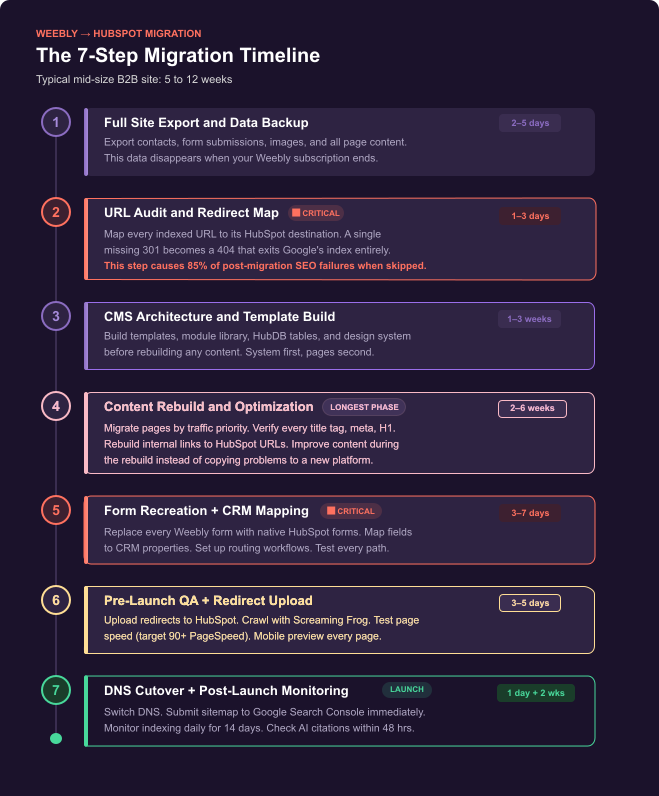
Step 1: Full site export and data backup
Before you touch HubSpot, pull everything off Weebly. This is your insurance policy.
- Export all contacts as CSV. Open the file and verify it parses correctly. Check for encoding issues with special characters, accented names, and phone number formats.
- Export all form submissions. Screenshot the Weebly forms dashboard if needed. This data will not survive subscription cancellation.
- Download every image and file. Use a site scraper like HTTrack or wget if the Weebly file manager makes bulk download difficult. Rename image files with descriptive, keyword-relevant names before uploading to HubSpot (e.g., weebly-hubspot-migration-checklist.png, not IMG_4392.jpg).
- Copy all page content into a staging document. Preserve the URL, title tag, meta description, H1, and any structured content (tables, lists, CTAs) for each page. This becomes your migration reference sheet.
Time estimate: 2 to 5 days depending on site size. For a 50-page site with a blog, budget 4 full working days.
Step 2: URL audit and redirect map
This is the step that separates a clean migration from an SEO disaster. Every URL currently indexed by Google needs a mapped destination in HubSpot.
- Pull a full list of indexed URLs from Google Search Console. Cross-reference with a Semrush or Ahrefs crawl to catch any pages GSC missed.
- Build a spreadsheet: Column A = current Weebly URL. Column B = new HubSpot URL. Column C = redirect type (301 for everything unless you are deliberately removing a page). Column D = notes on any URL structure changes.
- Where possible, keep the same URL slug. /about-us on Weebly should be /about-us on HubSpot. Changing slugs during migration doubles your redirect risk.
- Flag blog post URLs separately. Weebly blog URLs often follow a /blog/post-title pattern. Decide now whether your HubSpot blog will use /blog/post-title (recommended) or a different path. Changing the blog URL structure requires individual 301s for every post.
Time estimate: 1 to 3 days. This is not optional. An incomplete redirect map is the single most common cause of post-migration ranking loss.
Step 3: HubSpot CMS architecture and template build
Do not start recreating pages yet. Build the system first.
- Define your template types: homepage template, service/product page template, blog post template, landing page template, and a generic content page template. Most B2B sites need 4 to 6 templates.
- Build a shared module library in HubSpot. Headers, footers, CTAs, testimonial blocks, feature grids, and FAQ accordions should all be reusable modules. This is what allows your marketing team to publish new pages without developer involvement post-launch.
- Set up HubDB tables if your site has structured, repeating content (team members, product listings, location pages, resource libraries). HubDB is one of HubSpot CMS's most underused capabilities and it eliminates the need to maintain dozens of nearly identical pages manually.
- Configure your design system: typography, colours, spacing, button styles. Lock these into the theme settings so individual editors cannot accidentally break visual consistency.
Time estimate: 1 to 3 weeks. This is the investment that pays off for the next two years. Skip it and you build a site that looks good at launch but fragments within six months.
Step 4: Content rebuild and optimization
Now you rebuild pages, section by section, starting with your highest-traffic URLs.
- Prioritize the top 20 pages by organic traffic. These are the pages where any migration error costs you the most. Rebuild, verify metadata, and test each one before moving to lower-traffic content.
- Do not just copy content over. This is your chance to improve. Update outdated copy. Add internal links to new pillar pages. Improve page speed by replacing heavy Weebly-embedded elements with native HubSpot modules.
- Verify every title tag, meta description, H1, and image alt text against your migration reference sheet. HubSpot's built-in SEO panel will flag missing or duplicate metadata automatically.
- Rebuild internal links to point to HubSpot URLs, not old Weebly URLs. If you migrate content with internal links still pointing to Weebly paths, those links become 404s or unnecessary redirect chains the moment you go live.
Time estimate: 2 to 6 weeks depending on page count. This is almost always the longest phase.
Step 5: Form recreation and CRM property mapping
Forms are where most CMS migrations quietly break the revenue pipeline.
- Recreate every Weebly form as a native HubSpot form. Do not use embedded third-party forms. HubSpot native forms write directly to CRM contact records, which is the entire point of this migration.
- Map each form field to the correct HubSpot CRM property. If your Weebly form had a "Company Size" dropdown, decide which HubSpot property it maps to and whether the values match. Mismatched property mappings create dirty CRM data that poisons lead scoring downstream.
- Set up form submission workflows: notification emails to the right sales rep, lifecycle stage updates, enrolment in nurture sequences, deal creation for high-intent forms.
- Test every form on desktop and mobile before launch. Submit a test entry and verify it appears in HubSpot CRM with the correct properties, lifecycle stage, and workflow enrolment.
Time estimate: 3 to 7 days. This phase is short but high-stakes.
A broken form on your pricing page costs you actual pipeline.
Step 6: Pre-launch QA and redirect implementation
This is the phase where discipline separates professional migrations from DIY projects.
- Upload the entire redirect map into HubSpot's URL Redirects tool (Settings > Content > Domains & URLs > URL Redirects). Verify each redirect resolves correctly by testing a sample of 20 to 30 URLs manually.
- Run a full crawl of your staging site with Screaming Frog or a similar tool. Check for broken links, missing metadata, orphaned pages, and redirect chains (a redirect that points to another redirect instead of the final destination).
- Test page load speed on Google PageSpeed Insights. Target a score of 90+ on both mobile and desktop. Compress any images over 100KB. Lazy-load below-the-fold content.
- Preview every page on mobile. Check heading sizes, table scrollability, CTA button tap targets, and form field usability. Weebly sites often have mobile quirks that do not carry over to HubSpot's responsive framework, so visual QA catches surprises early.
Time estimate: 3 to 5 days. Do not compress this phase. QA shortcuts compound after launch.
Step 7: DNS cutover and post-launch protocol
The actual switch is anticlimactic when everything before it was done correctly.
- Update DNS records to point your domain to HubSpot's hosting infrastructure. HubSpot provides specific DNS instructions for all major registrars (GoDaddy, Cloudflare, Namecheap, Google Domains). The change propagates globally in 24 to 48 hours.
- Submit your updated sitemap to Google Search Console immediately. Your sitemap is at yourdomain.com/sitemap.xml. Request indexing for your top 20 pages manually via the URL Inspection tool.
- Monitor Google Search Console's Coverage and Indexing reports daily for 14 days. Flag any 404s, soft 404s, or crawl errors immediately. These are usually missed redirects and can be fixed in minutes.
- Check AI engine citation within 48 hours. Search your primary topics in ChatGPT, Perplexity, and Google AI Overviews. If your new pages are not appearing, review the answer capsule and first 200 words of each page for clarity and directness.
- Share the migration announcement on LinkedIn. The author (your head of marketing or a named team member) posts, not just the company page. Personal posts get 3 to 5x the organic reach.
Time estimate: 1 day for cutover, 2 weeks for active monitoring.
Will You Lose SEO Rankings During a Weebly to HubSpot Migration?
This is the question that stalls more migrations than any technical concern. The honest answer: you will see ranking fluctuations for 2 to 4 weeks. You should not see ranking losses if the technical process is followed correctly.
Google does not penalize platform migrations. Google confirmed in 2016 that a properly implemented 301 redirect now transfers 100% of PageRank to the destination URL. The old 15% penalty on 301s no longer exists. This was confirmed by Gary Illyes on the Google Search team and has been validated repeatedly by Ahrefs, Moz, and Semrush studies since.
What does cause ranking loss:
- Missing redirects. Every indexed URL without a 301 becomes a 404. Google treats 404s as content removal, not migration. That URL exits the index entirely, and recovering it takes 6 to 12 weeks of re-crawling.
- Changed URL structures without mapping. If /blog/my-post becomes /articles/my-post and there is no redirect connecting them, Google sees them as two unrelated pages. The old page dies. The new page starts from zero authority.
- Metadata loss. If your new pages launch without title tags, meta descriptions, or H1s that match (or improve upon) the originals, Google recalculates relevance from scratch. This is avoidable and preventable.
A practical data point from our own migration projects: B2B sites with fewer than 100 pages that follow this process recover to pre-migration traffic levels within 2 to 3 weeks. Sites with 200+ pages typically take 3 to 5 weeks due to Google's crawl budget distribution across more URLs.
The real risk is not Google. It is internal teams cutting corners on the redirect map because they want to launch faster.
Our HubSpot CMS migration process builds the redirect map first, not last, which is why our clients see 2-week recovery windows instead of 3-month ones
How Much Does a Weebly to HubSpot Migration Cost?
Costs vary by scope, but they should not be mysterious. Here is what real projects look like across our agency and peer firms in the HubSpot partner network.
|
Site Type |
Pages |
Timeline |
Typical Cost Range |
|
Startup / small site |
Under 20 |
3 to 5 weeks |
$5,000 to $12,000 |
|
Mid-size B2B |
20 to 75 |
5 to 8 weeks |
$12,000 to $28,000 |
|
Large B2B with blog |
75 to 200 |
8 to 14 weeks |
$25,000 to $45,000 |
|
Enterprise with integrations |
200+ |
12 to 20 weeks |
$40,000 to $80,000+ |
Cost drivers beyond page count include: custom module development (a single complex interactive module can take 20 to 40 hours), third-party integrations (payment gateways, ERP syncs, partner portals), content rewriting (if the migration is also a messaging refresh), and CRM data
cleanup (normalizing messy Weebly exports into a clean HubSpot import).
The cost of not migrating is harder to quantify but more important to understand. A 50-page B2B site on Weebly generating 3,000 monthly visitors with a 2% conversion rate produces 60 leads per month.
If 10% of those leads convert to pipeline at a $15,000 average deal size, that is $90,000 in monthly pipeline sourced from the website. If Weebly support ends unexpectedly and your site goes down for even two weeks, the pipeline impact is immediate. Migration costs are an insurance premium against that scenario.
Weebly vs HubSpot CMS: What Changes After You Migrate?
This is not a feature checklist. Most comparison articles give you two columns of checkmarks and let you count. That misses the point entirely. The difference between Weebly and HubSpot CMS is not about which buttons exist in the interface. It is about what happens to your data after someone visits a page.
On Weebly, the answer is: nothing. The visit is counted in an analytics dashboard and forgotten. On HubSpot, the answer is: that visit creates a CRM record, contributes to a lead score, and feeds a workflow that routes the contact to sales if the behaviour matches your buying signals.
That is a structural difference, not a feature difference. Here is how it breaks down.
| Capability | Weebly | HubSpot CMS |
|---|---|---|
| CRM connection | None; requires third-party connectors | Native; every visitor auto-creates a CRM contact |
| Form data routing | Stored in dashboard; no CRM sync | Maps to CRM, triggers workflows, routes to reps |
| Content personalization | Not available | Smart content (lifecycle, lists, device, geo) |
| Revenue attribution | Traffic only; no deal attribution | Native content-to-deal attribution |
| Marketing automation | Manual CSV export | Native workflows (visits, forms, engagement) |
| Page editing | Page-level drag-drop; limited control | Module-level; full section control |
| SEO tooling | Basic meta only | Built-in SEO, clusters, schema |
| Developer platform | Minimal custom code | HubL, modules, HubDB, CLI |
| Governance & permissions | No role-based access | Permissions, approvals, governance |
| Platform trajectory | Maintenance mode (no updates since 2021) | 228k+ customers; ~25% YoY; active AI (Breeze) |
The comparison that matters most is the last row. Platform trajectory determines whether your investment compounds or decays over time. Weebly is a depreciating asset. HubSpot CMS is infrastructure that gains capability with every quarterly product release.
How Do You Choose the Right HubSpot CMS Migration Agency?
There are roughly 6,000 agencies in the HubSpot Solutions Partner Program.
Most of them do CRM implementations, email marketing, or sales training. Far fewer specialise in CMS migrations, which require a different skillset: technical SEO, CMS architecture, redirect engineering, and CRM data modelling.
Here is how to filter quickly.
- Ask for a migration case study with documented SEO outcomes at 30 and 90 days post-launch. Traffic trends, not testimonials. If the agency cannot show you a real ranking recovery curve from a past migration, they have not done enough of them.
- Ask when in the process they build the redirect map. The correct answer is before any content rebuild starts. If they build redirects as a final step before launch, expect gaps. Redirects built early get tested early.
- Ask how they handle CRM property mapping for migrated forms. If the answer is vague or focuses only on design, the team treats this as a website project. You need a team that treats it as a revenue infrastructure project.
- Ask what the handover looks like. You should get full admin access, a documented CMS architecture, a recorded training session, and an internal owner who can publish and edit without agency dependency.
HubSpot partner tiers (Gold, Platinum, Diamond, Elite) correlate with volume of client activations and platform expertise. Elite Partners sit in the top tier.
OneMetric is a HubSpot Elite Partner with a dedicated CMS migration practice built around the process documented in this article.
Key Takeaways
- Weebly is in maintenance mode with a confirmed support window through mid-2026. Migration is inevitable. Controlling the timing is the strategic advantage.
- The redirect map is the single highest-risk element of any CMS migration. Build it first, test it before content rebuild, and verify it post-launch.
- HubSpot CMS is not just a publishing tool. It is CRM-native infrastructure that captures buyer signals, feeds lead scoring, and provides content-to-revenue attribution out of the box.
- Post-migration ranking recovery takes 2 to 4 weeks when the process is followed correctly. Without a structured process, recovery stretches to 3 months or beyond.
What to Know Before Starting Your Weebly to HubSpot Migration
Most teams wait until Weebly forces the decision. By then, you are migrating during a support blackout with compressed timelines and no staging room for error. The companies that migrate now control the process. The ones that wait inherit the consequences.
A Weebly to HubSpot migration done on your schedule takes 8 weeks. Done on Weebly's schedule, it takes 8 weeks plus whatever revenue you lose while scrambling.
Ready to move off Weebly?
We will review your current site, build a redirect risk assessment, map your CRM data architecture, and give you a project scope with timeline and cost. No commitment required. This is how 200+ B2B companies started their migration with OneMetric.