- Share
-

-

HubSpot Agent Hub is a central workspace for activating, managing and monitoring AI agents across marketing, sales, service and operations. Agent Builder allows Professional and Enterprise customers to create custom agents using CRM data, business knowledge, instructions and tools.
TL;DR
- HubSpot Agent Hub brings prebuilt and custom AI agents into one workspace.
- Teams can use agents for research, sales follow-up, support, CRM analysis and other repeatable work.
- Agent Builder supports no-code setup, but custom integrations may still require development.
- Agent usage can consume HubSpot Credits.
- The real challenge is not creating agents. It is giving them clean data, clear instructions and the right permissions.
HubSpot launched Agent Hub and Agent Builder in public beta on July 23, 2026.
At first glance, it looks like another AI product update.More agents. More automation. Another interface.
But the bigger change is underneath. HubSpot is moving AI from isolated writing tools into the operating layer of the CRM - part of a broader shift toward autonomous, agentic growth."
Agents can research accounts, interpret customer context, recommend actions and, when configured, update records or support business processes.
That makes the opportunity bigger.
It also makes CRM quality, permissions and process design far more important.
HubSpot Agent Hub at a glance
|
Question |
Answer |
|---|---|
|
What is Agent Hub? |
HubSpot’s central workspace for AI agents |
|
When did it launch? |
July 23, 2026 |
|
Current status |
Public beta |
|
Who can access it? |
Professional and Enterprise customers |
|
Can businesses build agents? |
Yes, through Agent Builder |
|
Does Agent Builder require coding? |
Not for standard agent creation |
|
Can agents run automatically? |
Yes, including through workflows |
|
Does usage consume credits? |
Yes, depending on the agent and action |
|
Can actions require approval? |
Yes, when human review is configured |
What is HubSpot Agent Hub?
Agent Hub is the new home for HubSpot’s AI agents.
It gives teams one place to:
- Discover available agents
- Activate prebuilt agents
- Manage custom agents
- Review agent status
- Monitor recent results
- Control access and usage
Agent Hub is the management layer.
Agent Builder is where businesses configure and create custom agents.
Is Agent Hub replacing Breeze Agents?
Agent Hub is effectively the new home for HubSpot’s Breeze Agents.
Breeze remains HubSpot’s broader AI layer, but agents are now managed through a more centralized workspace.
|
HubSpot AI product |
Primary role |
|---|---|
|
Breeze |
HubSpot’s broader AI layer |
|
Agent Hub |
Activate, manage and monitor agents |
|
Agent Builder |
Create custom agents and agentic workflows |
|
Breeze Assistant |
Conversational AI assistant within HubSpot |
This makes HubSpot’s AI structure easier to understand.
Breeze provides the intelligence. Agent Hub organizes the workforce.
What can businesses use Agent Hub for?
Agent Hub can support work across marketing, sales, service, customer success and RevOps.
|
Team |
Practical application |
|---|---|
|
Marketing |
Research accounts, identify campaign themes and summarize customer questions |
|
Sales |
Prepare meeting briefs, monitor buying signals and draft outreach |
|
Service |
Answer routine questions, qualify enquiries and escalate complex cases |
|
Customer Success |
Summarize account activity, tickets and possible risk signals |
|
RevOps |
Research records, identify missing context and support data-quality work |
|
Operations |
Build custom agents around company-specific processes |
The goal is not to automate every task.
It is to find work that requires context, happens repeatedly and currently depends on someone manually reviewing scattered information.
What are some practical Agent Hub use cases?
Sales meeting preparation
An agent can review company records, recent emails, calls, deals and public information.
It can then prepare a concise account brief before the meeting.
Buying-signal research
A prospecting agent can monitor signals such as funding, hiring or leadership changes.
It can research the account, check previous CRM activity and prepare outreach for the sales representative.
For a step-by-step setup, see our HubSpot Prospecting Agent playbook.
Deal follow-up
After a sales call, an agent can identify:
- Agreed next steps
- Open questions
- Important objections
- Missing stakeholders
- Potential risks
It can then draft a follow-up or recommend the next action.
Customer support
A customer agent can answer common questions using approved business information.
It can resolve straightforward requests and escalate conversations that require human judgement.
Customer-health summaries
An agent can review tickets, emails, meetings and recent account activity.
It can summarize the relationship and highlight possible churn, adoption or expansion signals.
CRM research
A data agent can review records, conversations, documents and external information.
It can help answer questions such as:
- Why has this deal slowed down?
- Which competitor was mentioned?
- What problem is the customer trying to solve?
- Is there a possible expansion opportunity?
Should businesses use a prebuilt or custom agent?
Not every use case requires Agent Builder.
|
Use a prebuilt agent when… |
Build a custom agent when… |
|---|---|
|
The task is common across businesses |
The process is specific to your company |
|
HubSpot already provides the capability |
The agent needs custom rules or actions |
|
Standard CRM data is enough |
It requires custom objects or external systems |
|
The default output fits the workflow |
The output must follow an internal process |
|
You want faster deployment |
The use case justifies deeper implementation |
Start with a prebuilt agent where possible.
Build a custom agent when the process itself is different.
Does HubSpot Agent Builder require coding?
No. Standard custom agents can be created without coding.
Teams can define instructions, select CRM context, add business knowledge and configure available tools through Agent Builder.
Development may still be required when an agent needs:
- A custom API connection
- A company-specific integration
- An external business application
- A reusable custom agent tool
- More complex action logic
The builder is no-code.
The surrounding architecture may not be.
Agent or workflow: which one do you need?
Use a workflow when the rules are predictable.
For example:
When a deal moves to Closed Won, create an onboarding task.
The trigger and action are already known.
Use an agent when the work requires interpretation.
For example:
Review the latest sales call, identify the main concern and recommend the best next step.
A simple distinction:
- Workflows follow rules.
- Agents interpret context.
In many cases, they will work together.
An agent interprets the situation. A workflow handles the structured action that follows.
Can HubSpot agents run automatically?
Yes. Agents can run manually or through HubSpot workflows.
A workflow can send information to an agent, use its response and continue with later automation steps.
This can support processes such as:
- Preparing account summaries
- Reviewing call information
- Recommending next steps
- Updating selected records
- Routing issues for human review
Automated execution should still include clear limits, permissions and exception handling.
How do custom HubSpot agents work?
A custom agent combines four elements.
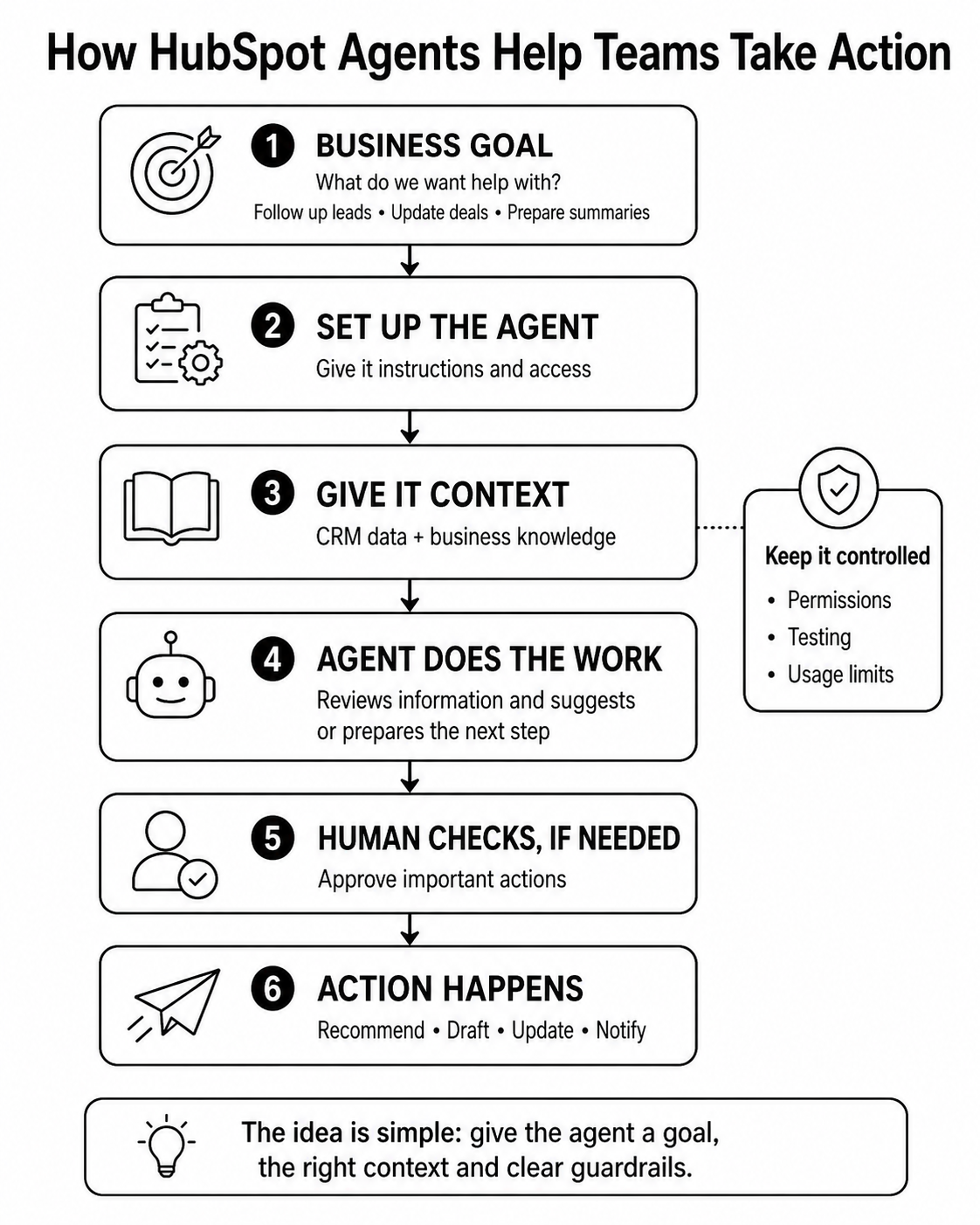
Instructions
Instructions define the objective, expected behaviour, required inputs and output.
This should be treated as process documentation, not simply prompt writing.
CRM context
The agent may use authorized information from contacts, companies, deals, tickets, calls and activities.
Access depends on permissions, tools and configuration.
Business knowledge
Knowledge may include:
- Product information
- Internal processes
- Policies
- Knowledge vaults
- Approved business content
Better knowledge usually creates better output.
Tools
Tools allow the agent to perform configured actions.
These may include:
- Reading CRM records
- Updating CRM records
- Browsing the web
- Calling external APIs
- Performing other configured actions
A human approval step can be added before sensitive actions run.
Can HubSpot agents connect with external systems?
Yes. HubSpot agents can work with external systems through custom agent tools and APIs.
Developers can create reusable tools that allow an agent to interact with external applications or perform company-specific actions.
This could include:
- Retrieving information from another platform
- Sending data to an external system
- Checking an order or subscription
- Running a custom calculation
- Triggering a defined business process
The agent should only receive the tools required for its specific job.
How does Agent Hub control access to CRM data?
Agent access depends on:
- HubSpot AI settings
- User permissions
- Agent permissions
- Available tools
- CRM record access
- Human approval settings
Administrators can control who can run or edit an agent and what data it can access.
Selected actions, including CRM updates, can require review before execution.
This matters because an agent should not inherit unlimited access simply because it operates inside the CRM.
How does HubSpot Agent Hub pricing work?
Agent Hub is available to Professional and Enterprise customers.
However, running agents can consume HubSpot Credits.
|
Agent action |
Published usage |
|---|---|
|
Data Agent prompt for one record |
10 credits |
|
Customer Agent resolved conversation |
50 credits |
|
Prospecting Agent outreach recommendation |
100 credits |
|
Content Agent asset generation |
1,000 credits |
Custom-agent usage depends on the number of action units required during a run.
Teams should therefore ask:
- How often will the agent run?
- How many actions will each run require?
- Is the result valuable enough to justify the usage?
Credit limits should be designed into the process before launch.
Where can users find Agent Hub inside HubSpot?
Eligible users can access Agent Hub from the Breeze area inside their HubSpot portal.
The navigation may appear as:
More → Breeze → Agent Hub
Because Agent Hub is in public beta, labels and navigation may change as HubSpot develops the experience.
What are the current limitations of Agent Hub?
Agent Hub and Agent Builder are still in public beta.
Current limitations and considerations include:
- Access depends on subscription and permissions.
- Agent actions may consume HubSpot Credits.
- Output quality depends on CRM data and instructions.
- Some actions require custom tools or development.
- Automated runs need clear limits and governance.
- Human review may still be required.
- Product capabilities may change during the beta.
Businesses should avoid treating beta functionality as a completely autonomous operating system.
The biggest mistake: automating an unclear process
Suppose sales representatives regularly forget to update the next step on a deal.
It may seem logical to ask an agent to review the call and update the field automatically.
But what qualifies as a valid next step?
What happens when the customer mentions several possible dates?
Who checks the update when the transcript is unclear?
Which workflows depend on that field?
Without clear answers, the agent does not fix the process.
It accelerates the ambiguity.
We saw this with traditional CRM automation too.
Automating a messy process rarely makes it cleaner. It simply makes the mess move faster - a reminder that poor data quality is the silent growth killer behind most failed automation.
How should businesses select their first use case?
A strong first use case should be:
- Repeated frequently
- Time-consuming today
- Supported by reliable data
- Easy for a person to review
- Useful even if the agent only recommends or drafts
- Measurable through time saved, response speed or conversion
Good starting points include:
- Meeting-preparation briefs
- Account research
- Deal summaries
- Support-question handling
- Next-step recommendations
- CRM research
Avoid beginning with pricing decisions, contracts, sensitive communication or irreversible record changes.
Start where the agent can assist before it acts.
What should businesses do before adopting Agent Hub?
Define one outcome
“Help the sales team” is too broad.
“Review discovery calls and draft the agreed next step” is clearer.
Audit the underlying data
Check the properties, associations, activities and documents the agent will use.
An agent cannot repair inconsistent CRM definitions on its own - which is exactly why you should clean your data before you scale AI inside HubSpot
Set the permission boundary
Decide whether the agent can:
- Clean your CRM data Read
- Recommend
- Draft
- Update
- Trigger
- Communicate
Not every agent needs permission to act.
Test difficult scenarios
Do not test only with clean records.
Include missing fields, conflicting information, unclear transcripts and unusual customer requests.
The exceptions will tell you whether the agent is ready.
Our view: Agent Hub makes CRM architecture more important
HubSpot is making agent creation easier.
That does not make implementation decisions disappear.
Businesses still need to decide:
- Which outcome should the agent support?
- Which data can it trust?
- Which tools can it use?
- Where is human approval required?
- How will success and cost be measured?
- Who is accountable for incorrect output?
These are CRM and revenue operations questions.
They cannot be solved with a better prompt alone.
The companies that benefit most from Agent Hub will not be the ones that activate the largest number of agents.
They will be the ones that select the right processes, provide reliable context and keep humans involved where judgement matters.
Do not start with 'Which agent should we activate?'
Start with the process your team repeats every week.
Find where people lose time, where context gets scattered and where decisions slow down.
Then decide whether an agent should recommend, assist or act.
That is the difference between adding another AI feature and building a useful operating capability.
Planning to deploy HubSpot Agent Hub?
OneMetric can help you identify the right use cases, audit and prepare your CRM data, and design the permissions, tools, integrations and governance required to deploy agents safely.