- Share
-

-

Search for ActiveCampaign to HubSpot migration cost and you will find price ranges that rarely say what they include. Many of them put ActiveCampaign in the same row as other marketing automation tools, so they tell you little about your own account. A small list with a few tags and one welcome automation is a different project from a large list with deals in ActiveCampaign CRM, dozens of live automations, and several connected tools.
This guide does not add another range. It shows what moves the cost, what you can count yourself before asking for a quote, and how to compare ActiveCampaign migration pricing from different providers on the same terms. The same logic applies to ActiveCampaign to HubSpot cost as a whole, not just the project fee.
What Determines ActiveCampaign to HubSpot Migration Cost?
The total is rarely one line. It is made up of five budgets, and most plans miss at least one of them.
|
Budget |
What it covers |
What often gets missed |
|---|---|---|
|
Migration project |
Audit, data mapping, automation rebuilds, testing, and go-live support |
A pilot run and a reconciliation check |
|
HubSpot subscription |
The plan you need and your marketing contact tier |
A tier increase caused by the import |
|
Internal team time |
Decisions on what to keep, mapping approvals, and testing |
Nobody counts it, so nobody plans for it |
|
Overlap |
Both tools running until the cutover is validated |
The ActiveCampaign renewal date against your go-live date |
|
Reserve |
Room for issues found after the audit |
Having none |
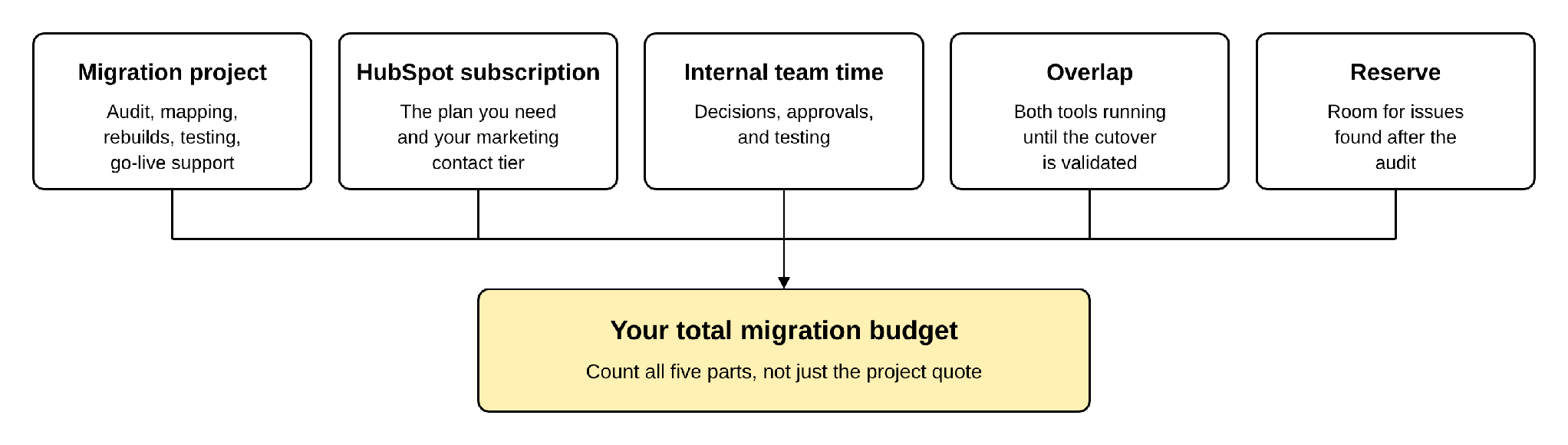
ActiveCampaign adds its own pressure points. Tags, lists, and custom fields all need a destination in HubSpot. Automations have to be rebuilt, not moved. If you use ActiveCampaign CRM, deals and pipelines come with it. Each one is a decision, and each decision has a cost.
People also search for HubSpot implementation cost when they mean this. The two overlap, but they are not the same. Implementation is setting up HubSpot for how your team works. A migration includes that setup, and it is also limited by what already exists in ActiveCampaign.
How Contact Volume and Data Complexity Affect Pricing
Volume affects how long extraction and checking take. Complexity affects how much design work the project needs. They are easy to confuse, and they move different parts of the budget.
Volume changes the schedule and your HubSpot bill
ActiveCampaign's help documentation says contacts export as a CSV file and the download link expires after 7 days. Larger exports need to be planned, not left to the last day. For deals, the API returns 100 records per page at most, so a large deal history is pulled in many requests.
HubSpot bills on marketing contacts, which are the contacts you actively market to. Your subscription includes a contact tier, and per HubSpot's documentation, going over it by even one marketing contact moves you to the next tier until renewal. HubSpot imports contacts as non-marketing unless you set them otherwise, so the jump only happens if a large group is marked as marketing contacts without anyone checking the count.
HubSpot lets Super Admins and users with billing permission set a cap on marketing contacts. Once the cap is reached, contacts arriving through imports are set as non-marketing. Choosing the cap, and deciding which contacts should be marketing contacts, before the import is one of the cheapest ways to protect the budget.
Complexity changes the design work
ActiveCampaign exports contacts with custom fields, lead scores, and deal scores in their own columns. Tags come out combined in a single column, and list membership is exported separately. Contact notes cannot be exported. Every one of these needs a decision: which become HubSpot properties, which become segments, and which are not worth moving.
Automation and Workflow Rebuilding Costs
Marketing automation migration cost is the part of the budget that is hardest to estimate without opening the account.
ActiveCampaign's help articles describe copying an automation inside your account and sharing it with another ActiveCampaign user through a share link. They do not describe exporting automations to another platform. HubSpot's Smart Transfer article for ActiveCampaign lists contacts, deals, accounts, email templates, segments, users, and groups, and it does not list automations. In practice, automations are rebuilt in HubSpot, not moved.
What decides the cost of that rebuild:
- How many automations are live. Count the active ones. Old automations nobody uses should be retired, not rebuilt.
- How complex each one is. Branches, wait steps, goals, and conditions each have to be reproduced and tested.
- What each one depends on. Tags, lists, deal stages, site events, and forms must exist in HubSpot first.
- Whether anyone owns it. An automation with no owner and no clear purpose is a decision waiting to be made, and decisions take time.
- The HubSpot plan. HubSpot documents workflows as available with Professional or Enterprise subscriptions. If you plan to use a lower tier, the plan itself is part of the cost.
A useful way to think about it: rebuilding is a chance to ask what each automation was meant to achieve, then rebuild that outcome. Copying the old logic step by step usually carries the old clutter with it.
Data Cleaning, Mapping, and Deduplication
Cleaning is not an extra. It reduces the work in every step after it.
- Fewer records to move. Inactive contacts, duplicates, and test records you leave behind reduce the work and keep your marketing contact count down.
- Fewer fields to map. Unused custom fields do not need a HubSpot property.
- Clear tag decisions. HubSpot's Smart Transfer moves ActiveCampaign tags once, into a custom contact property, and does not keep them in sync. Whether a tag should be a property, a segment, or nothing is a design decision worth making on purpose.
- Consent kept intact. Contacts who unsubscribed must stay unsubscribed. HubSpot supports importing opt-outs, and that import works on any subscription. Getting this wrong is a compliance problem, not only a data problem.
Deduplication deserves its own attention. HubSpot automatically deduplicates contacts by email address and companies by domain name. During an import, a row that matches an existing contact updates that contact instead of creating a duplicate, and a row with no unique identifier creates a new record. If more than one existing record matches, that contact is not imported and you get an error. Duplicates in ActiveCampaign therefore turn into merged records, import errors, or extra records someone has to review. People who sit in your account under two different email addresses will not be merged automatically, and companies with no domain will not be matched. Each of these is project time, which is why duplicates are worth removing before the move.
Mapping also covers deals. If you use ActiveCampaign CRM, the deal export includes pipeline, stage, owner, contacts, account, and dates. Deal notes cannot be exported, and tasks appear only as the next task date. Pipelines and stages need to be designed in HubSpot before deals are loaded.
Integration and Third-Party Tool Costs
ActiveCampaign rarely sits alone. Website forms, site tracking, ecommerce, webinar or payment tools, and automation connectors all point at it. Each one needs a decision: reconnect it to HubSpot, replace it, or retire it.
- Forms and tracking. Website forms are rebuilt or replaced, and HubSpot's tracking code goes on the site.
- Connected apps. Some will have a HubSpot connector, some will not, and some may need a paid plan on the other tool's side.
- Email sending setup. To send email from your own domain in HubSpot, the domain needs MX, DKIM, SPF, and DMARC records. The work is small, but it has to be done before go-live, and it affects whether your first campaigns reach inboxes.
- Custom data. HubSpot custom objects need an Enterprise subscription, and Smart Transfer does not transfer them. If your data model needs them, the budget changes.
List every system that sends data to ActiveCampaign or reads from it before you ask for a quote. This is where hidden costs usually sit.
Testing, Validation, and Go-Live Support
Testing is tempting to cut and expensive to skip.
A sound migration runs a pilot on a sample first, to check mapping and associations before the full run. After the full load, it checks record counts, property values, subscription status, deal stages and ownership, and that each rebuilt automation behaves as expected on test contacts.
Activity history needs its own plan. HubSpot's import tool can create emails, meetings, notes, and tasks, but it cannot update the ones that already exist. A wrong load cannot simply be fixed by importing again, so it has to be right the first time.
Go-live also needs a cutover plan. The same person should not receive emails from both platforms. ActiveCampaign should stay available until validation is done, and your renewal date should be checked against your go-live date so you are not forced to choose between paying for another term and cutting validation short. Cancelling the old account early to save money is a false saving.
DIY vs. Managed ActiveCampaign Migration
Both are reasonable. The right one depends on what is in your account.
|
DIY |
Managed |
|
|---|---|---|
|
Best when |
Mostly contacts, few automations, no deals, someone on your team knows HubSpot |
Live automations, deals, several integrations, strict consent needs, or a tight go-live date |
|
Cash cost |
Lower. Often only the tools and the HubSpot plan |
Higher. You pay for scoping, rebuilds, testing, and support |
|
Your time |
High. You own mapping, cleanup, testing, and fixing mistakes |
Lower. You review and approve |
|
Main risk |
Marketing contact tier jump, consent errors, automations rebuilt without testing |
Paying for scope you did not need if the quote is not specific |
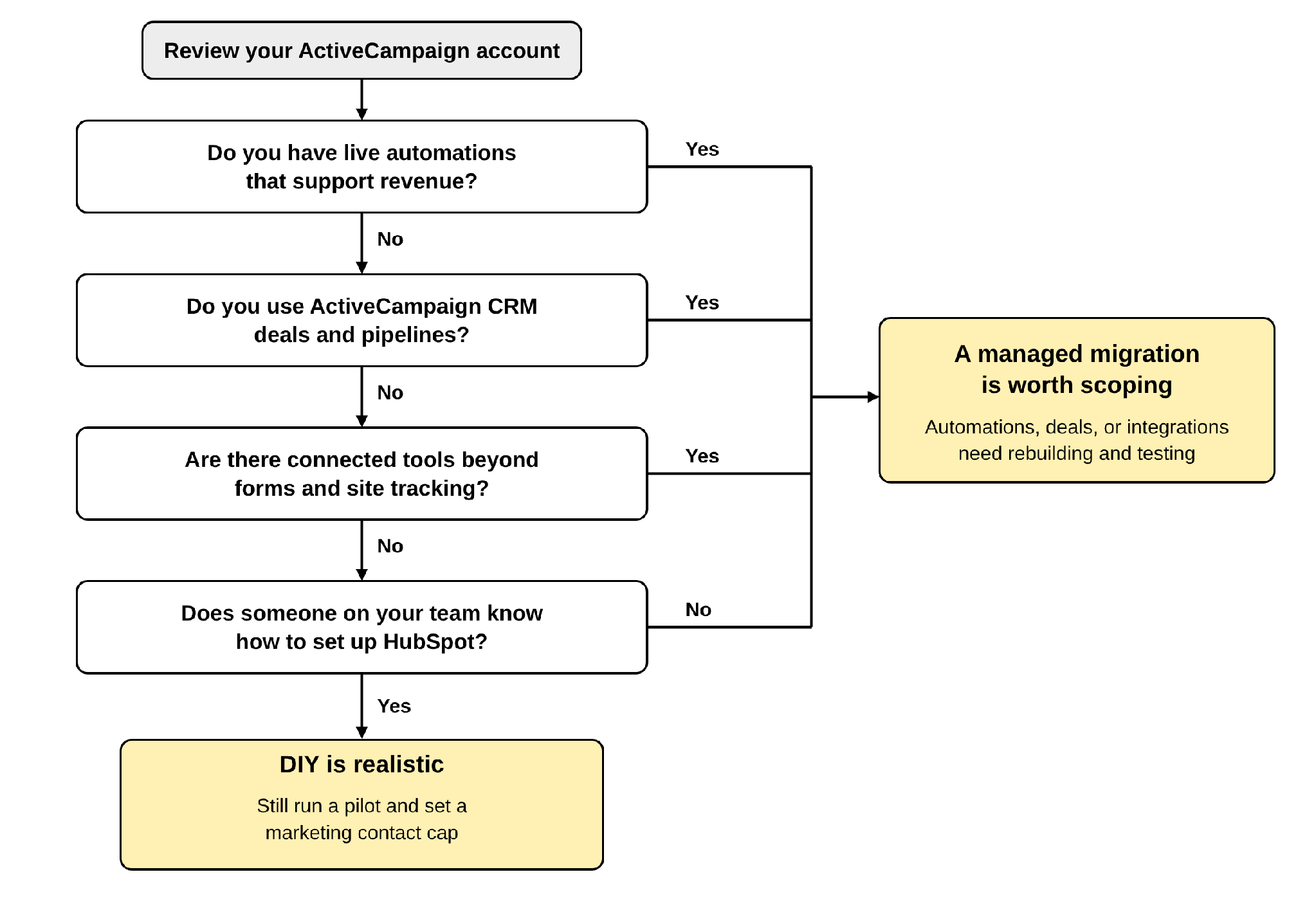
HubSpot's own Smart Transfer is the usual DIY route for ActiveCampaign. It moves contacts, deals, accounts, email templates, segments, users, and groups. Lists, notes, and tags are transferred once after the sync, not kept in sync, and automations are not on the list. A DIY migration therefore still includes rebuilding work, and that is where the time goes.
If you are weighing HubSpot migration services against doing it yourself, compare your own hours against the quote, not the quote against zero.
How to Estimate Your Migration Budget
You can build a useful CRM migration budget before you talk to anyone. Start by counting what is in your account.
|
What to count |
Where to find it |
Why it moves cost |
|---|---|---|
|
Total contacts, and how many you actually email |
Contacts and your sending history |
Drives the marketing contact tier and extraction |
|
Lists and tags |
Lists and Tags in your account |
Each needs a mapping decision |
|
Custom fields in use |
Field settings |
Each becomes a property or is dropped |
|
Live automations, and how complex they are |
Automations overview |
Rebuilt and tested one by one |
|
Deals and pipelines |
Deals, if you use ActiveCampaign CRM |
Pipelines and stages are rebuilt first |
|
Forms and email templates |
Forms and Campaigns |
Rebuilt or reused in HubSpot |
|
Connected apps and site tracking |
Integrations and your website |
Reconnect, replace, or retire |
|
Unsubscribed and bounced contacts |
Contact status |
Consent has to carry over exactly |
Then work through four steps:
1. Decide what to leave behind. Inactive contacts, dead automations, and unused fields come off the list.
2. Choose the HubSpot plan and marketing contact count. This is your recurring cost, and it should be set before the data moves.
3. List what must be rebuilt. Automations, forms, and templates, each with a priority.
4. Ask for a scoped quote. Share the table above with each provider so they quote the same thing.

When quotes come back, compare what each one includes: automation rebuilds, a pilot migration, validation, activity history, consent handling, and a support window after go-live. A lower quote that leaves several of these out is not lower.
How to Reduce Migration Costs Without Increasing Risk
- Clean before you move. Fewer, better records cost less to move and less to hold as marketing contacts.
- Set the marketing contact cap early. It protects you from an unplanned tier upgrade during the import.
- Retire automations you do not use. Rebuild the ones tied to revenue first.
- Settle the HubSpot plan first. Designing around a feature you cannot use costs rework.
- Export early. ActiveCampaign's export download links expire, after 7 days for contacts and 30 days for deals, so plan the timing.
- Run a pilot. A small test finds mapping problems while they are cheap to fix.
|
WHAT NOT TO CUT Validation, consent handling, and testing of automations. These protect your sending reputation and your data. |
Conclusion
ActiveCampaign to HubSpot migration cost is not one number. It comes from your contact volume, how tangled your data is, how many automations need rebuilding, how many tools connect to your account, how much testing you need, and which HubSpot plan you choose. The fastest way to a reliable budget is to count what is in your account first and ask every provider to quote the same scope.
If you want that estimate built around your own account, OneMetric can assess your ActiveCampaign setup and outline what the move to HubSpot would involve.